

What Happens After a Missed Call? A Practical Lead-Response Workflow for Local Service Businesses
A six-step, provider-neutral workflow that helps local service teams capture, acknowledge, assign and close the loop on calls, messages and forms.
Dzmitry Khmialeuski
Founder-led field note
Local businesses rarely lose leads because nobody cares. They lose them because the lead arrives at the wrong moment.
The technician is on a ladder. The office manager is helping a customer. The owner is driving. A message appears in one inbox, a phone call in another, and a form submission in a third. Everyone plans to follow up later. Nobody owns the next step.
That is the gap between marketing and operations.
Google itself treats responsiveness as part of the Local Services Ads experience. Its ad-ranking documentation notes that missed calls may negatively affect responsiveness, and its lead-management documentation explains when message response-time estimates may appear in an ad. That does not mean every missed call costs a job. It means response handling is a measurable part of the system, not an administrative detail.
Start by mapping every way a lead arrives
Before adding automation, list the actual entry points:
- Google Local Services Ads calls;
- Google Local Services Ads messages or bookings, when available;
- Google Business Profile call and website actions;
- website forms;
- direct phone calls;
- text messages;
- Facebook or Instagram messages;
- referral emails;
- scheduling tools.
For each source, record three things:
- Where does the notification go?
- Who owns the first response?
- Where is the outcome recorded?
If any answer is "whoever sees it," you have found an operating gap.
A six-step lead-response workflow
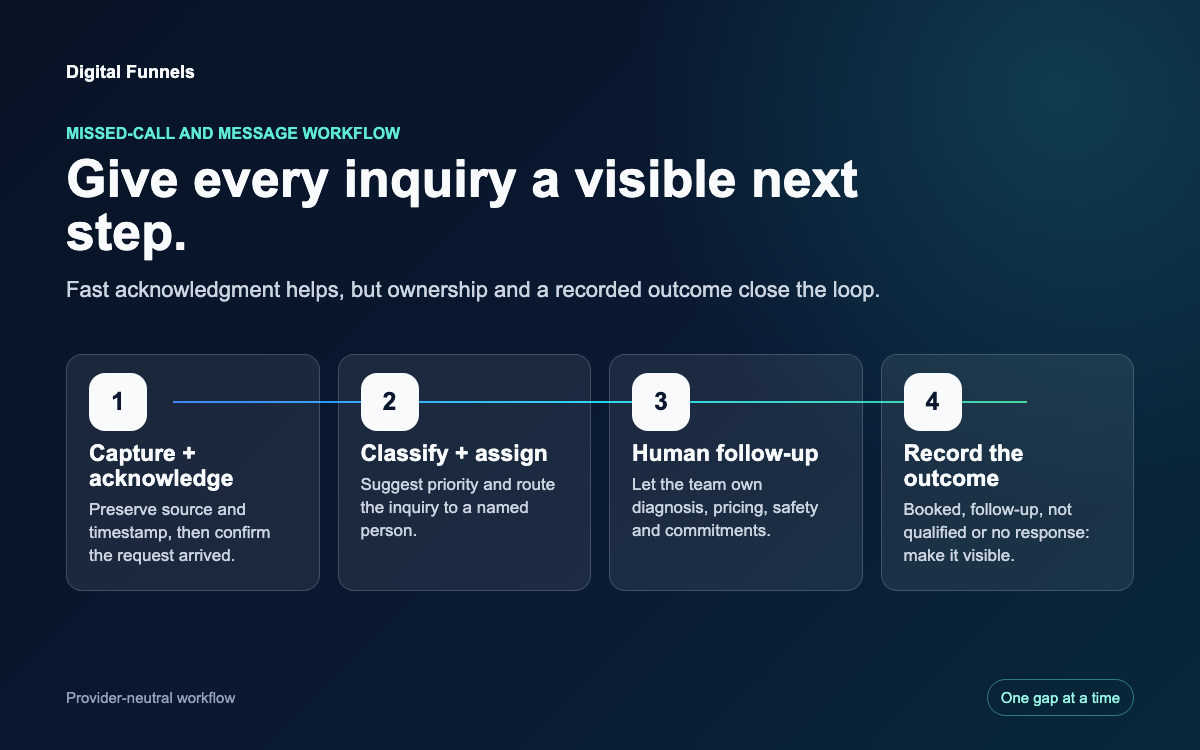
1. Capture
Create one event for each new inquiry. Preserve the source, timestamp, customer contact method and basic request. Do not force staff to retype information that already arrived through a form or call platform.
The goal is not to build a giant customer database on day one. The goal is to make the inquiry visible and assignable.
2. Acknowledge
Send a short confirmation through an approved channel:
We received your request. A member of our team will review it and follow up.
Do not pretend that a technician has diagnosed the problem. Do not promise an arrival time that has not been confirmed. The acknowledgment tells the customer the request did not disappear.
For text messaging, make sure consent and opt-out handling match the channel and your business's legal requirements. Automation should fail safely when consent is unclear.
3. Classify
Use a small set of operational labels:
- emergency or safety concern;
- same-day request;
- estimate or consultation;
- existing customer;
- service outside the company's scope;
- spam or duplicate.
An AI agent can suggest a label from the customer's words. A person should own high-risk decisions, regulated questions, pricing and promises.
4. Assign
Route the inquiry to a named person or role. "Office" is not an owner. "Maria - weekday dispatch" or "on-call manager" is.
Assignment should match the way the business already works. A five-person garage-door company does not need an enterprise queue with 30 statuses. It may need one group text, one backup person and one visible list of unhandled inquiries.
5. Follow up and hand off
Give the assigned person the information already collected and a clear next action:
- call the customer;
- request a photo;
- confirm ZIP code;
- schedule an estimate;
- explain that the service is not offered;
- escalate to the owner.
If the first person does not act within the business's chosen response window, notify the backup. Choose the window from staffing and customer expectations; do not publish an impossible SLA.
6. Record the outcome
Use a short outcome list:
- booked;
- estimate scheduled;
- needs follow-up;
- not qualified;
- duplicate;
- no response;
- declined.
Add the minimum note needed for the next person. This is where lightweight automation is often more valuable than a new CRM. The system can ask a technician for a 20-second voice or text update in the messenger they already use, then store the structured outcome.
CRM software works only when information reaches it.
Build an after-hours boundary
After-hours automation should not act like an unsupervised employee.
A safe pattern is:
- acknowledge the request;
- detect emergency or safety language;
- show the customer the correct emergency instruction approved by the business;
- notify the on-call person when appropriate;
- queue normal requests for the next staffed window;
- keep an audit record.
The system should always have a human transfer or fallback path. If the provider, model or database is unavailable, the customer should receive a safe, honest response rather than a fabricated answer.
What AI should do
AI is useful for:
- summarizing a voicemail or message;
- extracting service type and location;
- suggesting priority;
- drafting a response;
- routing to the right person;
- reminding the backup owner;
- turning a short staff update into a structured note;
- identifying inquiries with no recorded outcome.
People should own:
- final pricing;
- technical diagnosis;
- safety decisions;
- regulated or sensitive conversations;
- promises about arrival or availability;
- exceptions and refunds;
- the decision to accept or decline work.
Automate the gaps. Keep the people.
Measure the workflow, not just the ads
Google Business Profile performance can show profile calls, website clicks and other interactions. Local Services Ads reports can show charged leads and spend by call, message or booking. Those are useful inputs, but they do not prove the job was booked.
Add four internal metrics:
- inquiries received by source;
- inquiries acknowledged;
- inquiries with a named owner;
- inquiries with a final outcome.
Then track median first-human-response time and booked outcomes by source. Do not use a fake industry benchmark. Compare the business against its own baseline and staffing schedule.
A seven-day implementation plan
Day 1: list every lead source and notification destination.
Day 2: name the primary and backup owner for each source.
Day 3: agree on acknowledgment language and human-response windows.
Day 4: define six or seven classification and outcome labels.
Day 5: connect one high-volume source to one shared queue.
Day 6: test normal, after-hours, duplicate and emergency scenarios.
Day 7: review every inquiry and fix the first broken handoff.
Start with one repeatable gap. Do not rebuild the whole business before proving the workflow.
Digital Funnels can help map this system, configure the managed automation and keep a human approval boundary. See the lead-response solution, the managed follow-up service, or run a Free Business Scan to identify the first public-facing gaps.